Easy Timer Plus
All-in-one tool which combines a pretty desktop clock and an intuitive timer.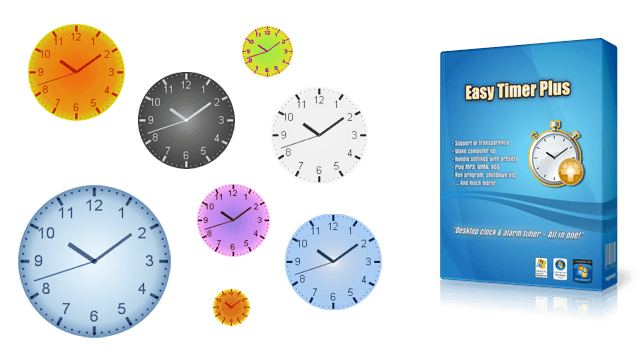
all-in-one alarm timer & desktop clock!
Introduction
Easy Timer Plus is a smart tool which offers great features making it a pretty desktop clock and an intuitive alarm timer at once.
You can use MP3's as the alarm sound. The clock's transparency, colors, position and size can be adjusted as needed. Moreover it's possible to wake up your PC and flash the whole screen on alarm.
Other features include actions like running a program or automatic shutdown. Helpful are the separated analog clock and systray balloontips which display lot of useful information.
In the following we will go further into detail and explain what makes Easy Timer Plus special. ✨
Features
Transparent Desktop Clock
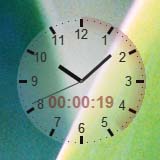
Each color of the analog desktop clock (e.g. background and borders) can have a different level of visibility. With the clear color chooser it's very easy to pick the right colors and its transparency.
Of course the transparency is entirely optional. You have full control of how the clock looks.
This unique feature allows you to perfectly fit Easy Timer Plus in your desktop. Furthermore it helps when you've e.g. configured the clock to be always on top, because with transparency you can see through and thus always know what's under it!
Wake Up Computer Automatically
It's possible to easily wake your computer up from sleep mode or hibernation on alarm time. Moreover it's possible to automatically set the alarm time and activate the timer on program start-up.
With this feature you can e.g. let your computer start automatically at morning or when coming back from work!
Flash Whole Screen
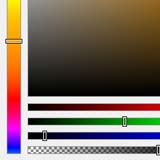
If necessary Easy Timer Plus can be configured so that the whole screen will flash on alarm. Here the color and transparency level can be chosen as needed.
If you want an additional visual indication for the alarm (e.g. when the alarm sound is turned off), this feature is just exactly what you need!
MP3, WMA, Ogg and Videos as Alarm Sound
Use audio files in the popular MP3, WMA, Ogg, Wave or FLAC format as the alarm sound. Many more formats such as MIDI or even common video formats are supported as well.
This allows you to play your favorite music on alarm instead of the other pre-installed alert sounds!
Start Special Alarm Actions
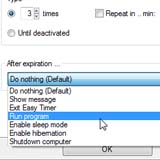
With Easy Timer Plus it's possible to start certain special actions after the alarm has finished. Available are: Run any file (e.g. another app, a video file, office tool etc.), close the app, show a customizable message, enable sleep mode, hibernate the computer or shut it down.
An example situation where this feature could come in handy: It's late at night and you've decided to watch a movie on your computer. Then during the movie you fall asleep… Fortunately you've set up Easy Timer Plus so that it automatically shuts your computer down afterwards!
…Plus No-Nonsense, Locales, Presets
Additionally Easy Timer Plus comes with all the basic features of the regular version, like:
Buy Now …It's Easy & Secure!
Further Questions?
Use the free Trial Version to try out all features without restrictions. If you want to read everything up in more detail, consult the Feature List .
You can find more information regarding the app and the ordering process in our support area. And as always just contact us if you need help or have any questions.